
Housing Allowance Spreadsheet Instructions
IMPORTANT:When you first open the file it may say it is a “Read Only” file; however, when you save the file on your hard drive you will be able to make changes and work in the spreadsheet.
This Housing Allowance workbook is pretty well set to use. You may want to make some changes to fit your situation better. Instructions for modifying and using this spreadsheet are listed below.
With claiming housing allowance exclusion, meticulous recordkeeping is an absolute necessity! You can use this housing allowance spreadsheet to keep track of the date, description of the housing expense, how it was paid, and amount.
However, you also need to keep all necessary documentation such as:
- property tax statements
- mortgage payments (interest and principal payments) receipts
- receipts for cost of maintenance and repairs
- utility statements
- insurance statements
- receipts for furnishings
- receipts for cleaning supplies
- receipts for all amounts spent on home improvements.
- receipts for lawn care
- any receipt that relates to an eligible housing expense
You can keep these in a secure location such as your file cabinet or even an expandable file folder. I suggest keeping each month’s receipts in their own file folder or pocket. I would also print off each month’s expenses and totals from the spreadsheet and keep with that month’s receipts.
If you do your own taxes, you will be very glad you have all your housing allowance expenses organized and if an accountant does your taxes...they won’t groan so loud when they see you coming :)
Entering Data:
Okay...we are ready to open your housing allowance spreadsheet and either begin to use or do any modifications we need to do to make it more user-friendly.
The first worksheet is simply a list of eligible and ineligible housing allowance expenses.
You can delete this sheet is you want to...just right click on the tab “Expenses” and click delete. When the box pops up...click delete.
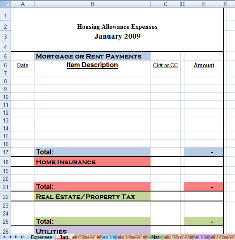
The second worksheet (Jan) is where you will be recording each month’s housing expenses. I have it sectioned off in individual expenses and an extra one at the bottom for any expense you use regularly.You can keep these or rename them what you want.
Simply click on the name and retype. It will automatically update the rest of the worksheets. If you do not need as many expenses, you can delete them. Instructions for deleting rows in this housing allowance spreadsheet are listed below.
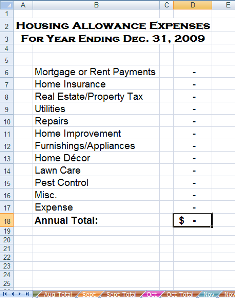
The third worksheet (Jan-Total) is a view-only sheet. It will automatically generate reports from the data you put in the second worksheet (Jan).
The remaining months are set up the same way.
The last worksheet is the “Annual” Report. It is a view-only worksheet also. You can regularly look at it to see how much you have spent in housing expenses year to date.
You may get into October or November and see you have not spent as much of your housing allowance as you have been allotted and decide it might be a good time to do that home improvement project you have been wanting to so.
Just remember you can only claim an housing allowance exclusion for the lesser amount of: your actual expense, your designated housing allowance, or the fair market rental value plus furnishings and utilities. See my housing allowance ebook for more details.
You can hide the accounts you do not need right now. With this method you can unhide them later if you need to.
Simply hightlight the accounts you want to hide and right click your mouse; go down to hide and click. You would then need to do that to all the reports...but when you need the extra accounts they are there to unhide and use.
But if you know you will not need anymore accounts and want to delete the unwanted accounts, follow these instructions:
First of all, SAVE an original copy.
- Click on second worksheet (Jan).
- Select the rows to need to delete with the desired amount of expense accounts. On the Home tab, in the Cells group, click the drop down arrow next to Delete, and then click Delete Sheet Rows.
- Select last cell in column E (the monthly total), hit F2, delete all the (+#REF!) out of the formula, hit enter.
- Now we have to fix the monthly total worksheet...click on the worksheet (Jan-Total).
- Click on the rows with the (#REF!) and delete each row. (If you deleted the last expense account, you will need to put the border back on the last expense now listed. You can do this by clicking on the home tab if not already there, in the font group, click on the borders arrow and go down to double border...or whatever border you want), click where you want it.
- Repeat above steps for each worksheet including the Annual worksheet.
****Notice: SAVE a copy before you start entering your data. This one will be your original to use every year.
Quick Links: Home | Blog | Newsletter | Free Spreadsheets
Products: Church Accounting Book | Church Accounting Package | Spreadsheet Package
Support: FAQ | Church Accounting FAQ | Contact
Site/Company Info: About | Terms of Use | Site Map


By Vickey Boatright Richardson Copyright © 2008-2024 All rights reserved
